
Free Website Speedtest Tool
Speed - SEO - Details
Enterramon turns raw site data into answers you can actually use. Run free, instant tests from 5 global regions and see exactly how your site stacks up. All the stats at once.
3,396+
across 756 domains, measured from 5 regions
75
across every site we've tested
60
vs average performance at 83 and security at 65
533ms
desktop load, mobile average 564ms
Real aggregate figures from tests run on this platform.
What the Website Audit Checks
Site Reports
Developer and Networking Tools
5 Checks Per Domain, 10 Per User, Per Day
SEO, Performance, Security, Overall Scores
Find Network Data
See Network & Server Information
Load Times
File Details
HTTP
SSL
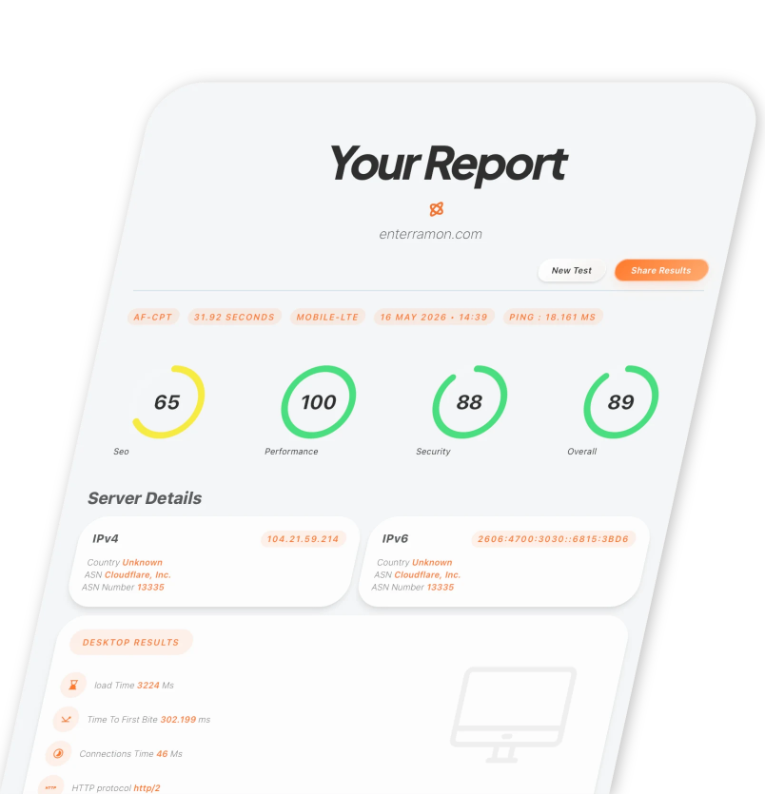
What You Get in Every Website Scan
A comprehensive technical audit that uncovers the hidden bottlenecks slowing down your growth.
Free Network & Website Tools
Domain Search Tool
Search available domain names instantly with real-time pricing. AI powered brandable name suggestions turn a business idea into ready to register names.
Ping Test
An essential latency test that measures real-time responsiveness and connection stability. It provides critical data on packet loss and round-trip times to ensure a consistent user experience.
Server Check
A comprehensive health audit that verifies server reachability, SSL validity, and CDN performance. It ensures your site is correctly configured and accessible across both modern and legacy IP versions.
Traceroute
A deep-path analysis tool that maps every network hop between the source and the target. It pinpoints the exact location of bottlenecks or failures within the global internet infrastructure.
DNS Lookup
Verify DNS record consistency across our global network. Check A, AAAA, MX, TXT, and more records from 5 regions with 4 public resolvers each.
MAC Address Lookup
Identify the manufacturer of any network device by its MAC address. Powered by the IEEE OUI database with real-time vendor details.
Robots.txt Tester
Analyze your site's robots.txt file for format errors, crawl rules, and get AI powered optimization suggestions.
IPv6 Test
Check whether your connection and server support IPv6, and verify dual-stack reachability. Confirms your site resolves correctly over both IPv4 and IPv6.
Broken Link Checker
Crawl your site to find broken internal and external links, broken images, and missing ALT text with sitemap validation against search-bot best practices.
Website Speed Test Questions
Is the website speed test free?
Yes. No account, no signup, no card. The free tier allows five checks per domain per day and ten per user per day, run from five global regions.
Which regions does the test run from?
Cape Town, Frankfurt, Singapore, St. Louis and Sydney. You pick the region, or run the report from all five to see how a site performs for visitors in different parts of the world.
What does the report measure?
SEO, performance, security and an overall score, plus Core Web Vitals, network infrastructure, SSL, HTTP and file checks, on both desktop and mobile, with a visual loading timeline and a prioritized list of fixes.
How long does a test take?
Roughly 20 to 90 seconds depending on the site. The report page updates as each stage completes.
Do I need an account to use the tools?
No. The free tools and the report work without an account. One is only needed for paid monitoring subscriptions and scheduled reports.
Scheduled Monitoring & Reporting
Upgrade to
Enterramon Pro
Unlock powerful scheduled reporting with advanced charts, deeper insights, and real-time alerts.
Automated health checks keep your domains monitored and performing at their best.
Stay ahead with active updates, enhanced analytics, and instant SMS notifications.
Scale effortlessly with more to come.
Full Detail Reports
Unlock fully featured scheduled reporting with advanced charts, detailed overviews, support for more domains, and real-time alerts.
The Portal
A sleek, user-friendly portal that puts you in control. Easily oversee your domains, review historical data, export reports, and leverage smart utilities
Unlimted on demand Tests
Run an instant test on any domain and get a full performance score with a prioritized list of actionable fixes.
Active Monitoring
Enable active updates and enhance charting to reflect more accurate, detailed data. With SMS Alerts.
Ready to supercharge your analytics?
Scheduled site tests, daily reports, and full clarity — built for developers and agencies.
